TripMapper
What is it?
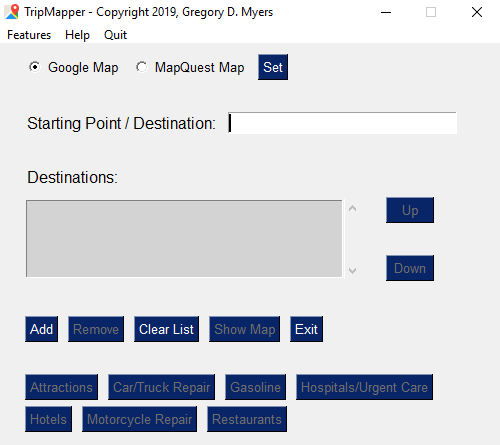
TripMapper enables a user to create either Google or MapQuest maps of their upcoming trip. Here's a screenshot of what it looks like:
Why TripMapper?
TripMapper
What is it?
TripMapper enables a user to create either Google or MapQuest maps of their upcoming trip. Here's a screenshot of what it looks like:
Why TripMapper?
I know what you're thinking. Why create a program when we have Google Maps and MapQuest, to name a couple. Believe me, these are AWESOME sites for creating maps!
However, Google does not offer more than 10 destinations via their mapping program, and they will not use routes that are closed in the Winter - even if the trip will be taken when the roads are open in the Spring, Summer, and Fall. Mapquest will allow routes with roads that would be closed in the Winter (for trips when the roads are open).
I take an annual motorcycle trip with a buddy of mine. I am always very thorough with my planning. In doing so, one of the things I like to do is to create a detailed map of our entire trip. It helps us visualize the entire trip and I love that. But here's where the problems first arose: Have you ever used Google Maps? It's my favorite. However, it always wants to take you the fastest route to reach your destination. The way around this is to strategically keep your data points (destinations) closer. You don't want to pick just 2 data points (i.e. Denver, CO to New Orleans, LA). Choosing just 2 points would not take you on the most scenic route. And, if getting there the fastest way possible is what you want? By all means, choose just 2 data points. Okay, so getting back to Google Maps. With Google Maps, as stated earlier, you can only choose 10 data points on the map (per map). That's it! And, for many short trips, that's fine. Or, you could just break up your trip into 10 data point sections. That doesn't work for me. I don't want a bunch of separate sub-maps. I want a single map of the entire trip.
So, using my TripMapper program, I can create my map in the Winter (if I so choose) and save it to a file as a MapQuest map (retaining the actual route I want). In the Spring when the roads are all open, I can load my saved trip into TripMapper and then choose that I want a Google Map (or leave it alone and keep the MapQuest map). I can then click on the Show Map button and voila! The map is created.
I added a bunch of features to help gather data that you might need/want for each destination of your choosing. For me, I keep a spreadsheet of my trip (I said I was thorough in my planning) and things like gas stations, hospitals, hotels, motorcycle repair, restaurants, attractions are all on there. And no, unfortunately the spreadsheet is not part of TripMapper. It's just an example of something I like to do in addition to having a map with me.
Can I try it out?
Sure, you can try it out. Here is a link to download the latest version of TripMapper.
How much does it cost?
Well, here's a shocker... there is no cost. Yes, I originally thought about charging for using TripMapper. But I felt that it would be best to give back to humanity - especially due to the rough year many of us experienced. If you're ready to register TripMapper and gain access to additional features, just send me an email with your first and last name and I'll send you a registration code free of charge. Absolutely no catch.
If you do find it useful, let me know. I'd love to hear about trips that you have planned with it. If you're loving it and want to buy me a coffee, I'd be honored.